
Lucky Patcher apk is an app mainly created for rooted Android smartphone developed by Chelpus with some great feature in it. Well this app is pretty popular in the Android underground world because it can hack (or crack) applications and games so we can hack for free in-app purchase, remove advertising, remove the app's license verification, and some other great feature. It's a one-stop-hack app solution :D. Beside great benefits in it, Lucky Patcher also have some negative risks like bootloop, system unstable, etc, so backup is suggested. But after one year using it, my phone is going okay no problem using it.
This is 3 main feature that made Lucky Patcher app becoming very popular today:
- In-app purchase hack (we can get item, buy stuffs, in app or game for free, wow!)
- Remove annoying ads in apps
- Remove Google license verification from an app.
The following requirement is needed to operating Lucky Patcher app:
- Rooted Android smartphone
- Android version 2.0 or up
- Little knowledge about Android phone
- Backup, if you needed
- Brain :v
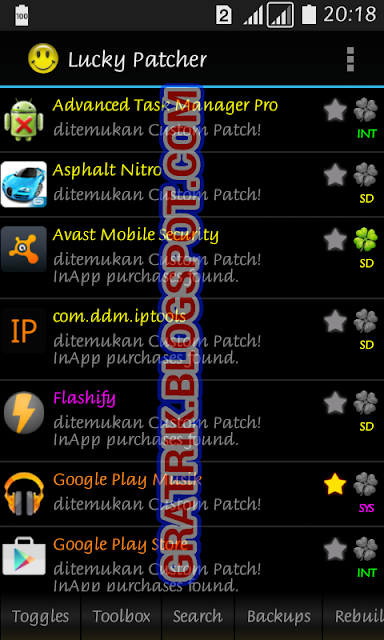
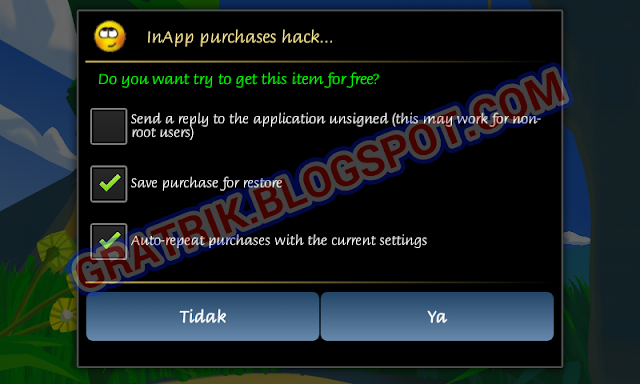
After the targetted hack toggles have been activated, now the second steps is we must apply the Lucky Patcher patch on app that you want to hack on it:
If you have Xposed Installed, it can even easier to apply Lucky Patcher to every app. Just activate the Lucky Patcher patch plus in Xposed module, and go to Lucky Patcher, open the top bar menu -> "Xposed setting" -> Choose what patch you want to apply, and it does not need manual patch on every app anymore.
All credits to:
- Chelpus and Developers of lucky patcher android application
- google.com
Lucky Patcher apk Android app updates changelogs:
This is 3 main feature that made Lucky Patcher app becoming very popular today:
- In-app purchase hack (we can get item, buy stuffs, in app or game for free, wow!)
- Remove annoying ads in apps
- Remove Google license verification from an app.
The following requirement is needed to operating Lucky Patcher app:
- Rooted Android smartphone
- Android version 2.0 or up
- Little knowledge about Android phone
- Backup, if you needed
- Brain :v


How to activate hack free in app purchase in apps or games using Lucky Patcher
- Open Lucky patcher.
- Tap "Switches".
- Tick "Google billing emulation", just make sure the switch become green.
How to block ads on all apps and games using Lucky Patcher
- Open Lucky Patcher.
- Tap "Toolbox" -> "block ads" -> "block ads on device"
- If you experience some errors on Play Store, Play Game, etc, Go to "Toolbox" -> "block ads" -> "clear the local host file"
How to activate License Verification hack in Lucky Patcher
- Open Lucky Patcher
- Tap on "Switches"
- Tick "Google license verification emulation
After the targetted hack toggles have been activated, now the second steps is we must apply the Lucky Patcher patch on app that you want to hack on it:
- Open Lucky Patcher and search and choose the app / game -> "Open menu of patches".
- Choose what you want to be hacked on it, is it the in-app purchase, license verification, etc. There are also some patching method to choose, for this one you need some experiment or ask someone expert who had patch that apps / game.
- There are also some optional options when patching like backup apk file just in case, apply patch to dalvik cache (this help so the patchs could survive better), etc.
- Apply the patch!
- Now open the app for test it :). Remember, different app may will need different patching method, so if you must experiment yourself or ask someone expert to choose the patch method.
If you have Xposed Installed, it can even easier to apply Lucky Patcher to every app. Just activate the Lucky Patcher patch plus in Xposed module, and go to Lucky Patcher, open the top bar menu -> "Xposed setting" -> Choose what patch you want to apply, and it does not need manual patch on every app anymore.
All credits to:
- Chelpus and Developers of lucky patcher android application
- google.com
Lucky Patcher apk Android app updates changelogs:
- v. 6.0.7
- Update translate
- Update custom patches
- Bug fixed - v. 6.1.5
- Fix android patch for “Disable signature verification in the package manager” for CM13 arm
- Translation updated
- Custom patches updated
- Bugs fixed. - v. 6.4.4
- Update modded Google Play to 7.3.07.K
- Update Android patches for arm
- Update custom patches
- Update translations
- Bugs fixed
Lucky patcher update android application version history download link
If you are updating from an older version of Lucky Patcher, it is recommended to uninstalls it first before installing the newer version.
- LUCKY PATCHER v. 6.0.7.apk (5.4 MB)
- LUCKY PATCHER v. 6.1.5.apk (5.4Mb)
- LUCKY PATCHER v. 6.4.4.apk (6.2 MB)


