Showing posts sorted by relevance for query Xposed. Sort by date Show all posts

5 Cool & Usefull Xposed Modules on Daily Usage for Your Android Device

Xposed is one of great app ever developed for Android platform. If you don't know what or for what Xposed is, then you are not an Android modder. It can be a prove too, if your friend say he is an Android modder but when you ask what is Xposed to him and then he doesn't know, then he is lying :D .

Actually the Xposed itself is didn't do anything real to your Android device. Xposed is adding a framework to your Android device / smartphone, then through the framework we can do unlimited possibilites using the needed applications which is called the "modules". And it don't take high risk to make modification on our Android device using the modules as every changes is done on the memory and can be easily reverted back just by deactivate the modules on the Xposed configuration.

xposed and android

The advantages of using xposed is: It don't require modification to system, not dried your RAM, and not exhaust your Android device CPU resources.

Now for you who are new to Xposed world, i can give you some of my preffered best Xposed modules that is very usefull. In unordered, the 5 Cool and Usefull Xposed Modules on Daily Usage for your Android Device version indophoneboy.blogspot.com.

  1. Native Clipboard (by "dhm47")


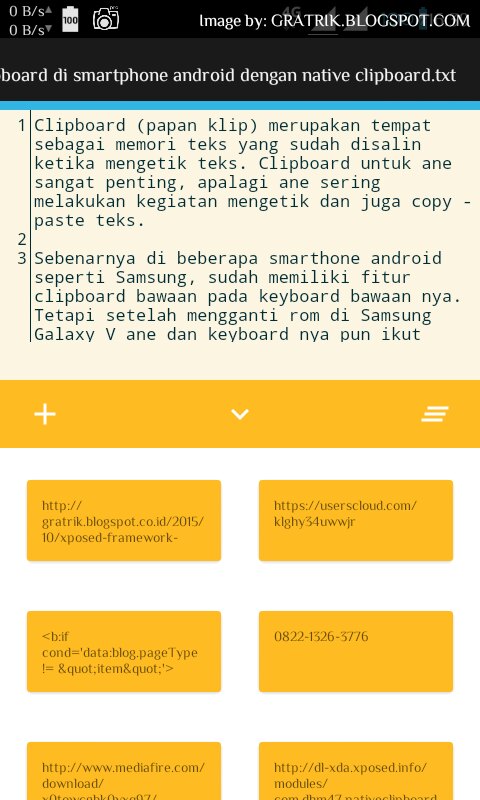
    Native Clipboard is great module and the best method to add clipboard funtionality to your Android device. Besides it small size and simple user interface, you will find rich features and customization which make this xposed module be the best Android application for you who are looking a clipboard functionality when typing on your Android device / smartphone.
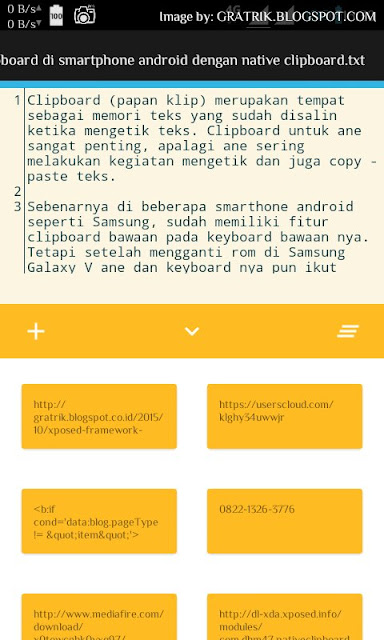

    Native Clipboard module work on every Android version which Xposed supported, from Android Kitkat to the newest Android Marshmallow. This application is also had many have many methods you can select to how the clipboard should be summoned.

    Read more info about Native Clipboard Xposed module application.
  2. XinternalSD (by "pyler")


    Do you have an Android smartphone / device with small internal storage size, but you want to install games with huge size? Or do you want to move the data or obb application from internal storage to external SD card? You just need do one thing, and it is to install the XinternalSD Xposed module.


    XinternalSD can change the application / game storage access behaviour by reditect it to external SD Card. This module even can fix the external SD card on Android Marshmallow to become full writable by default, so you no need to format the external SD card as internal to get the full write access.

    Read more info about XinternalSD Xposed module application.
  3. Xposed Additions (by "Spazedog")


    Xposed additions is the great module which mainly funtioned to remapping or even add a new function to your Android device button / key. This is a great application moreover if you had broken key / button on your Android device, so you can remap other button to replace that button.
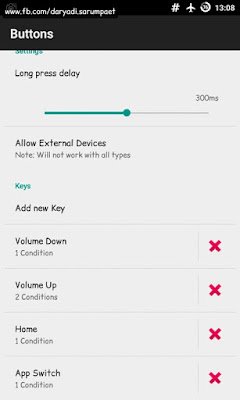
    xposed additions select key button to remap

    Not only change your Android device key function, Xposed Addition module is also can add new function through the long click on a key / button.

    Read more info about Xposed Addition module application.
  4. Stay Awake (by "92lleo")


    It is annoying when I'm playing Android games on My Android device the screen is going to sleep. Of course it not efficient, I must keep press the button just to make the screen is not off. Although some Android game is make the screen is always on by default, but some games is not. But now there is an Xposed module application to solve that, and it is Stay Awake.

    stay awake android application xposed user interface

    After we activate the Stay Awake module and activate the setting in it's application user interface, then you can press the combination "volume up" + "volume down" keys when playing your favorite Android game or using your applications on your Android device to enable or disable the screen timeout.

    Read more info about StayAwake Xposed module application.
  5. GravityBox (by "C3C076")


    GravityBox is an Xposed module to tweak your Android device display and UI (User Interface). It can do many things like modify the status bar, navigation, tweak the power button, notification panel and bunchs of other user interface tweak.

    gravitybox apk xposed module all android version

    Personally, I like about this Xposed module especially the feature to add a network traffic notification on the status bar on my Android smartphone so I can know the current speed of my internet.

    Read more info about GravityBox application Xposed module.


That's it all of them. It's all just Xposed modules application which I use often on my Android smartphone daily usage. You can find other hundreds of free Xposed modules on repo.xposed.info, and SOME of them is available on Play Store. Consider DONATIONS too to the developer if you found the module / application is usefull.

Best Xposed Theming App Module for Android I Ever Used [Xposed]

One amazing thing we can do on our Android device if we have Xposed installed, is we can modify and change the system theme (colors, transition effect, etc). The best is because it take advantage of use of Xposed framework and it means the look of our Android device system is changed without touching the apk of system. All changes is safe as it been made on memory and can be easily reverted back just by deactivate the module from the Xposed app.

There are many modules created by for theming our Android device out there. This is a great way for users who want / like to modify Android device looks and view but do not have coding skill or do not want to messy with apk decompiling-recompiling, just like me :D . Now here it is the 5 best Xposed module theming app for modifying Android device system User Interface, version www.indophoneboy.com.

  1. Wanam Xposed by "Wanam"


    Wanam Exposed is a great utility Xposed module Android application for tweaking Android system User Inteface, made especially for Samsung Touchwiz ROM based phone. We can change and modify the status bar, tweak the system menu like power menu, change background, change colors, etc. Wanam Xposed is have 2 version, for Samsung Android 4.2+ and for Samsung Android 5.x+. Its working best environment on a deodexed ROM.

    wanam xposed android module user interface

    Although mainly created for Samsung Touchwiz based phone, its not closing possibility to work on other Custom ROM though the compatibility might not be guaranteed. Head to the official thread of Wanam Xposed on XDA Forum.

    -> DOWNLOAD WANAM XPOSED MODULE.apk
    For Samsung Android 4.2+ (1.8 MB) | For Samsung Android 5.x+ (1.1 MB)
  2. Xblast Tools by "FemBlack"


    Xblast Tools is another great theming Xposed module for Android device. Based on my experience when used it, it is have no different purpose with Wanam Xposed, except Xblast Tools is created to serve for universal Android phone and ROM's starting from Android 4.0.3 and up. Check the thread by "FemBlack" on XDA Forum.

    xblast tools android xposed module user interface

    -> DOWNLOAD XBLAST TOOLS XPOSED MODULE.apk (6.1 MB)
  3. Android Theme Engine / Ex-Themer by "vishal11in"


    For the third entry, there is Android Theme Engine. Also there is 2 different name of this Xposed module but it looks it have actually same purpose and I can catch it because its created by same developer. Android theme Engine is created for more universal Android version from JellyBean, Kitkat to Lollipop, while Ex-Themer is created for Android Kitkat.

    android theme engine xposed module user interface

    What differencing Android Theme Engine and Ex-Themer from Xposed theming app i said above is they have a custom template selection option, which it can make total modification to the system theme and colors by applying from a template inside it (of course partially modification is still exist for you to use). Unfortunately, the compatibility is restricted to only AOSP (Android Open Source Project) based ROM and some popular Android phone only. Read more on the official thread on XDA Forum.

    -> DOWNLOAD ANDROID THEME ENGINE XPOSED MODULE.apk
    Android Theme Engine.apk (10.6 MB) | Ex-Themer.apk (for Kitkat) (2.7 MB)
  4. GravityBox by "C3C076"


    Now this is one of my favorites Xposed module, GravityBox. Actually the "theming" modification feature is almost no exist in this app. GravityBox only created to make some minor modification to the Android system framework like changing the status bar elements, navigation bar elements, power menu, key function tweak, etc. Still I like this Xposed module because it never fail on every ROM i have used and it support from Android Jelly Bean to the Android Marshmallow.

    -> READ MORE ABOUT GRAVITYBOX XPOSED MODULE.
  5. MonsterUI by "KuaQ"


    For the last one, there is a simple and great Xposed theming app for Android called "MonsterUI". The idea of MonsterUI is to theme Android framework style and colors to be a Lollipop Material style. This Xposed module is can work on every ROM's, but all the features and compatibility is working best on AOSP based ROM I think.

    -> READ MORE ABOUT MONSTERUI XPOSED MODULE.


All the Android Xposed module is available on repo.xposed.info. Consider DONATIONS to the developer if you think the application is usefull.

Xposed Framework Installer for Android 5.0 and 5.1 Lollipop / CM12.1 ROM

Back with another post about Xposed :v. What should i say? Xposed is a really great invention on Android platform, i really depend on it, more over to the Xposed Additions module to remap my screenshot button. Yeah, with Exposed Framework Installer and Xposed Additions module, now i can take screenshot in my Android smartphone with only holding the 'volume down' button.

Now i will share Xposed Framework Installer for you who used Android phone with Android version 5.0 and 5.1 version. The xposed for Android Lollipop and Marshmallow still developed by Rovo89@XDA and tungstwenty@XDA. The development actually is just on ALPHA-4 state. But I already used it on my Samsung Galaxy V with CM12.1 ROM and it's good no issue found. But beware this is still ALPHA-4 state, and i only try this on CM12.1 ROM, so different device, different ROM, maybe will bring different result.

Requirements
* Custom recovery installed. TWRP is recommended
* Xposed Framework zip flashable, apk, and Xposed Apk for Lollipop up version (download link in the end of post)
* Backup
* Brain :v

xposed v 3.1 for android lollipop and marshmallow up

How to install Xposed Framework Installer on Android Lollipop (tested on CyanogenMod 12.1 ROM


  1. Power off your Android smartphone, and boot into recovery mode.
  2. Just straight install the Xposed Framework.zip file through recovery. After done, wipe dalvik cache and reboot your Android smartphone. Caution! This first reboot time might take a very loooooooong time (on my Samsung Galaxy V it need more less 30 minutes to 1 hour for this first reboot.
  3. After reboot, just install the Xposed.apk for the Android Lollipop up. And finally your Android Lollipop smartphone is ready to rock with Xposed and the modules!
  4. If your Android phone suffer a soft brick or you want to remove xposed framework, then just boot back to recovery mode and try to flash (install) the Xposed Uninstaller.zip file.

Xposed + Framework Installer for Android Lollipop download link


The framework zip flashable are only for advanced users. If you don't have idea what hardware type your Android device is, then you can skip this section and READ DETAILED on XPOSED APK section.

Choose the proper file based on your hardware type. Samsung Galaxy V is an ARM based device.

Xposed Framework.zip

  • -> Xposed Framework.zip for SDK21 (Android 5.0 Lollipop)
    Download: ARM | ARM64 | x86
  • -> Xposed Framework.zip for SDK22 (Android 5.1 Lollipop / CM12.1 ROM)
    Download: ARM | ARM64 | x86

Xposed Uninstaller.zip


Download: ARM | ARMv5 | ARM64 | x86

Xposed.apk


Update changelog:
V 3.1
- Material Design
- Download the correct framework ZIP for your architecture/Android version
- Install/uninstall Xposed directly from the app, no custom recovery required (but obviously you must still make sure that you can reflash your ROM in case something goes wrong!)
- Many changes under the hood for better stability, compatiblity and code quality

# XPOSED v. 3.1.apk (2.8 MB) | 16/10/2016


Check out the original thread by Rovo89 at XDA Forum.

Xposed Framework Installer APK - Android Application Download

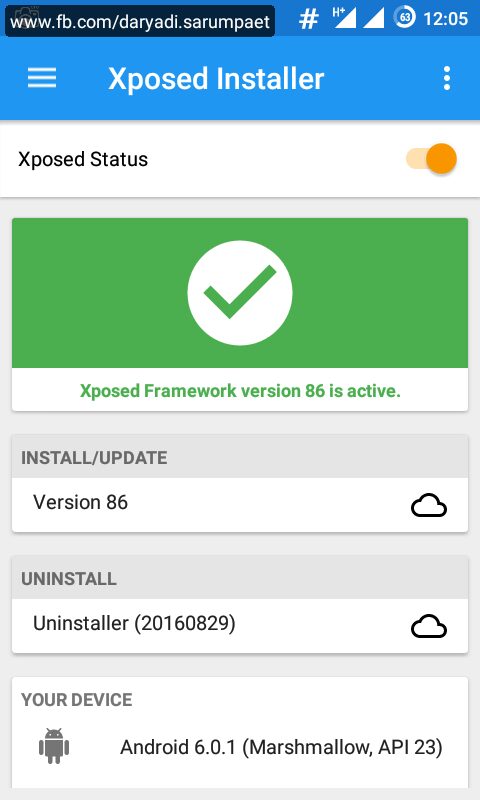
Xposed Installer is an Android application for rooted Android smartphone to adding a framework and we can install the modules for it to boost our Android device performance, change the appearance (color, icon, font, etc...), and another great function. Xposed is made by Rovo89@XDA and Tungtstwenty@XDA. To know more about xposed and how it works, you can visit the xda developer forum.

Quoted from the developer:

"Xposed is a framework for modules that can change the behavior of the system and apps without touching any APKs. That's great because it means that modules can work for different versions and even ROMs without any changes (as long as the original code was not changed too much). It's also easy to undo. As all changes are done in the memory, you just need to deactivate the module and reboot to get your original system back. There are many other advantages, but here is just one more: Multiple modules can do changes to the same part of the system or app. With modified APKs, you to decide for one. No way to combine them, unless the author builds multiple APKs with different combinations."

Xposed need Android version 4.0.3 up to 4.4. The Android Lollipop and Marshmallow version is still on developing progress untill now.

Steps to install Xposed Framework Installer for Android


  1. Make sure that your Android device is on rooted.
  2. Download, install, and open the Xposed Installer.apk, don't forget to grant it superuser rights if asked.
  3. Tap on "Framework", and then tap "Install / Update" to begin install Xposed on your Android smartphone device. After done, reboot the device.

  4. Allright, we now just need to install the modules for xposed. The modules is basically just a normal APK file like other application, you can choose which one you need and compatible with your Android device. Choose wisely because there is a million of Xposed modules out there :v . Again, you can visit the xda forum to get more information about Xposed modules.
  5. Install the module, and then open the Xposed app. Tap on "Module" and activate it by check it. Reboot your Android device, and the module is ready to rock and roll :v .


Xposed Installer Version History Android Application Download


# XPOSED INSTALLER v. 2.6.1.apk


-> Xposed Framework Installer for Android Kitkat 4.4.4 / CM11 ROM

-> Xposed Framework Installer for Android 5.0 Lollipop up / CM12.1 ROM

-> Xposed Framework Installer for Android 6.0 Marshmallow / CM13 ROM

How to Easily Remap Your Android Smartphone Key Button using Xposed Additions APK [Xposed]

Are you want to change a button function on your Android smartphone device ? Or you want to add a new function to a key button by "long press" it? The solution is easy and everything impossible using Xposed and the module developed by dev Spazedog called "Xposed Additions" apk. The app is amazing, it have more than 30 actions for us to add or remap our Android smartphone key / button.

Personally i used Xposed additions to remap the screenshot button. It sucks i have to press and hold the "volume down" and "power" to take a screenshot on my stock rom Android smartphone Samsung Galaxy V SM-G313HZ. Or worse, in CM12.1 rom you must press and hold the combination of three key: the "power" + "volume down" + "home" :v. But with this Xposed Additions apk now i remap it, i can take a screenshot only by holding the "volume down" button. Also i remap my long press "volume up" button into a flashlight / torch swither.

Quoted from the developer:

"Xposed Additions is a module that allows you to control some addition power and button features. This includes Full control of how the device should react during USB Plug/UnPlug and button re-map which allows you to assign new actions to click or long press of each button, including disabling it. The re-map allows you to assign different action for awake state and sleep state."


xposed additions select key button to remap

xposed additions volume up select condition

xposed additions screen on condition key remap

xposed additions list available remapping key

Requirements:
* Rooted
* Xposed Installed
* Xposed Additions.apk module (download link at the end of post)

Steps how to remap your Android smartphone key button using Xposed Additions module


  1. Install the Xposed Additions module and don't forget to activate it on Xposed module manager.
  2. Open the Xposed Additions app, don't forget to give it superuser rights if asked.
  3. Go to "Buttons" -> "Add new keys", and press the button / key you want to change the function or add new function on it.
  4. After the key added, choose the key. Now you can even set different behaviour based on device screen conditions, when screen on, screen off, or when the screen is locked.
  5. After you have set the conditions, now you can set the function for it, when the key clicked and when the key long pressed.

Xposed Additions apk download link


# XPOSED ADDITIONS v. 3.6.3.apk (1.4 MB)


The app is available at Playstore, rate it and give it nice comment if you find it usefull.